Posts mit dem Label Plugin werden angezeigt. Alle Posts anzeigen

20.07.2021

Die besten Plug-ins für Auto-Tune-Effekte und Pitch-Korrektur


Habt ihr zufällig schon die Doku-Serie „This is Pop“ auf Netflix gesehen? Direkt in der zweiten Folge geht es um Auto-Tune, den Effekt, der die Popmusik seit der Einführung im Jahr 1997 maßgeblich beeinflusst hat. Wer den Pitch-Korrektur-Effekt bekennend hasst, sollte sich auf jeden Fall mal diese Folge anschauen. Tatsächlich gibt es nur wenig Studio-Effekte, die so stark die Gemüter erhitzen, wie es Auto-Tune tut. Gleichzeitig hören wir den markanten Sound gefühlt überall. Dabei kann das Bearbeiten der Stimme auch völlig subtil vorgenommen werden – ursprünglich ist das sogar die eigentliche Aufgabe. In dieser Liste wollen wir euch einen Überblick der Plug-ins geben, mit denen ihr Gesang unauffällig korrigiert, Effekte wie bei Cher, Daft Punk und T-Pain erzeugt, oder sogar noch einen Schritt weiter geht.

Die besten Plug-ins für Auto-Tune-Effekte und Pitch-Korrektur

Wenn ihr diesen modernen Vocal-Sound in euren Produktionen verwendet wollt, seid ihr schon längst nicht mehr auf das Original von Antares angewiesen. Der Effekt ist eben so gefragt, dass viele Firmen auf den Zug aufgesprungen sind und teilweise sogar ihre eigene Interpretation abliefern. Denn bei dem Prinzip der Tonhöhenkorrektur geht es ja nicht nur um den bewusst drastisch eingesetzten Effekt (mit ultraschneller Korrektur), sondern ebenso um eine möglichst unauffällige Bearbeitung. Die ist im Grunde auch viel wichtiger bei der üblichen Studioarbeit. So findet ihr in dieser Liste ebenfalls Vorschläge, die nicht unbedingt für den typischen „Cher-Effekt“ stehen.

....


via gearnews.de
https://www.gearnews.de
https://ift.tt/36Odt72

22.04.2020

Deal: Arturia Plug-ins mit 50 Prozent Rabatt!


Deal: Arturia Plug-ins mit 50 Prozent Rabatt!Deal: Arturia Plug-ins mit 50 Prozent Rabatt!

Auch Arturia ist beim Frühjahrsputz angekommen und haut fast alle hauseigenen Plug-ins mit einer Preisreduktion von 50 Prozent raus. Das Motto für diese Aktion lautet: „Zuhause bleiben, Musik machen“. Mit dabei ist der vielseitige Synthesizer Pigments 2, alle Plug-in-Effekt-Bundles und Klangerzeuger aus der aktuellen V-Collection Reihe. Vielleicht ist jetzt die Zeit gekommen, das eigene Plug-in Sortiment ein wenig aufzustocken?

Arturia Plug-ins im Angebot

Zuhause bleiben und Musik machen. Etwas anderes bleibt uns in diesen Tagen sowieso nicht. Deswegen kommen doch diese Deals und Angebote wie gerufen! Na ja, natürlich nicht für unser Bankkonto. Arturia bietet jetzt bis zum 7. Mai 2020 alle Einzel-Plug-ins der V-Collection, Pigments 2 und die Effekte (Delays und Kompressoren) zur Hälfte des originalen Verkaufspreises an. Das klingt doch mehr als verlockend. Wer die Instrumente und Effekte noch nicht getestet hat, kann jetzt mit genug Puffer ausprobieren.
Der Hersteller hat sich zur Aufgabe gemacht, alte, legendäre Synthesizer in „Perfektion“ in ein Plug-in zu wandeln. Und das nicht nur grafisch. Dazu liegt jedem Plug-in ein riesiges Paket an Presets von von bekannten Sounddesignern für alle möglichen Musikgenres bei. Gefallen euch die Instrumente optisch und soundtechnisch, solltet ihr zuschlagen.

Preise und Daten

Das Arturia Angebot erhaltet ihr hier bei Plugin Boutique (Affiliate). Ihr solltet euch beeilen, da das Angebot nur bis zum 7. Mai 2020 aktiv sein wird. Die Plug-ins laufen auf Mac OSX 10.11 oder höher und Windows 7 oder höher standalone, als VST, VST3, AU und AAX in 64 Bit. Der Native Instruments NKS-Standard wird ebenso unterstützt. Zur Autorisation benötigt ihr die kostenlose Arturia . Eine Demoversion sowie ein PDF-Benutzerhandbuch gibt es ebenso auf der Internetseite des Herstellers als Download.

Weitere Informationen

via gearnews.de
https://www.gearnews.de
https://ift.tt/3cPNaOT

18.12.2019

Arturia Rev PLATE-140 Reverb Plugin Is FREE Until Christmas!

Arturia has released Rev PLATE-140, a high-quality plate reverb effect. The plugin is free to download until December 25th, 2019.
Rev PLATE-140 is a circuit-accurate software emulation of the iconic EMT 140 hardware reverb. Arturia’s plugin simulates the behavior of the original hardware unut down to the circuit level, including the vacuum tube preamp that is responsible for the reverb’s lush saturated sound. Much like the EMT 140, the plugin sounds amazing when used on individual tracks, or as the main reverb on the master bus.
REV Plate-140 is compatible with all digital audio workstations capable of hosting VST, AAX, or AU plugins. The product will be priced at $99 after the promo period ends on December 25th, 2019.
More info: Rev PLATE-140


via Bedroom Producers Blog
https://bedroomproducersblog.com
https://bedroomproducersblog.com/2019/12/17/arturia-rev-plate-140/

21.11.2018

Get iZotope Neutron Elements For FREE @ Pluginboutique!


iZotope is giving away the Neutron Elements ($129 value) audio mixing software for FREE with any purchase in the Pluginboutique online store ($1 minimum purchase amount) until November 3oth.
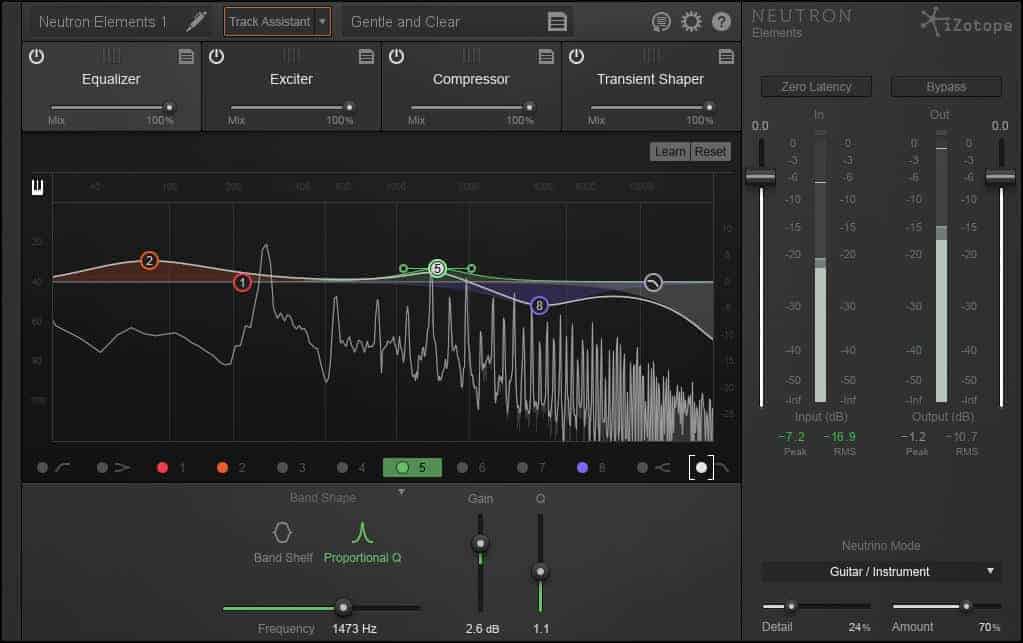
Neutron Elements is a lightweight version of Neutron Professional which is iZotope’s flagship audio mixing and music production suite in VST, VST3, AU, AAX, and RTAS plugin formats for compatible DAW applications on PC and Mac. Its standout feature is the Track Assistant, an auto-mixing tool which analyzes the audio material at hand and provides an EQ and compression starting point which can then be finetuned by the user.
In addition to the Track Assistant, the Elements edition of Neutron features a manually adjustable 12-band equalizer, a compressor, a transient shaper, an exciter, and over 200 presets to help novice users get started with the software. Also included is the Neutrino spectral shaper which automatically detects the different elements of a mix (vocals, drums, bass, etc.) and applies iZotope’s spectral shaping technology to add clarity and improve the balance of a mix.
Even if you don’t plan on using the Track Assistant automation feature, Neutron Elements is still worth the download as a powerful yet easy to use channel strip plugin. It includes all the basic mixing tools conveniently packed in a nicely designed user interface. The equalizer is especially good, thanks to its transparent sound and a built-in spectrum analyzer.
Neutron Elements is valued at $129, but you can get it completely free of charge with any purchase at Pluginboutique. If you buy any other plugin from their website (starting from $1), a copy of Neutron Elements will be added to your account at checkout. Here’s a quick look at some of the best deals currently on offer at Pluginboutique:
We guess that even more Black Friday deals will be added to Pluginboutique’s website later this week, so stay tuned for that. If you enjoy Neutron Elements and want to upgrade, you can currently get Neutron Standard for $99 ($249 regular price). Click here for a detailed comparison between the different versions of iZotope Neutron.
Neutron Elements is offered for FREE with any purchase at Pluginboutique. (offer ends on November 30th)


via Bedroom Producers Blog
https://bedroomproducersblog.com
https://bedroomproducersblog.com/2018/11/20/izotope-neutron-elements-free/

22.02.2018

A free plug-in brings extreme PaulStretch stretching to your DAW

You’ve heard Justin Bieber mangled into gorgeous ambient cascades of sound. Now, you can experience the magic of PaulStretch as a free plug-in.
It may give you that “A-ha” moment in ambient music. You know:

The developer has various warnings about using this plug-in, which for me make me want to use it even more. (Hey, no latency reporting to the DAW? Something weird in Cubase! No manual? Who cares! Let’s give it a go – first I’m going to run with scissors to grab a beer which I’ll drink at my laptop!)
Specifically:
The plugin is only suitable for radical transformation of sounds. It is not suitable at all for subtle time corrections and such. Ambient music and sound design are probably the most suitable use cases.
You had me at radical / not subtle.
Okay… yeah, this was probably meant for me:

You can use it two ways: either load an audio file, and just run PaulStretch in your DAW, or use it as a live processor on inputs. (That’s weird, given what it does – hey, there was some latency. Like… a whole lot of latency.)
It’s on Mac and Windows but code is available and Linux is “likely.”
https://xenakios.wordpress.com/paulxstretch-plugin/
If you want the original:
http://hypermammut.sourceforge.net/paulstretch/
https://github.com/paulnasca/paulstretch_cpp
That does other nifty tricks, like binaural beats and additional stretch modes. And it’s more reliable than this plug-in. The one catch: building for Windows and Linux is easy enough, and there are pre-built binaries available, but Mac users are mostly on their own. There was one project a few years back – but it seems it hasn’t been updated. (The blog post explains some of the complexity):
http://music.cornwarning.com/2011/12/07/new-paulstretch-os-x-build/
But the plug-in I think just became the easiest way to use it. Now go forth and make long sounds and chill to them.
The post A free plug-in brings extreme PaulStretch stretching to your DAW appeared first on CDM Create Digital Music.


from Create Digital Music http://ift.tt/2C7SpuH http://img.youtube.com/vi/ZmD7z7uH-Hg/0.jpg
via IFTTT

05.12.2017

5 Plug-In Management Tips For Cubase


1. Drag And Drop In MixConsole

Most people know how to add insert effects to a mixer channel in MixConsole. But did you know that you can pick any effect up from its slot and drag it to any other slot? Or, hold down the alt key while dragging to duplicate the effect to a new slot on any channel. The clever part about this second method is that it copies all the parameters of the effect, not just the effect itself. So let’s say you have spent ages getting a vocal compression set up just right. You could save it as a preset, but you can also quickly duplicate the instace to another channel, taking the setting with you as you go.

2. Use Cubase’s Powerful Track Presets

From any insert section either in MixConsole or the Track Inspector for a channel, you can click at the top of the FX list to choose to save (or indeed load) a Track Preset. This is a file that contains data about the plug-ins loaded as well as all their respective settings. In the Save window you actually get a bunch of options that go well beyond simple preset naming. You can add attributes, tags and even create folders to group presets together. Over time this is a good way to build your own library of FX chains for specific purposes, and achieve a signature sound.

3. The Plug-In Manager

In the Devices menu you will find access to Cubase’s Plug-In Manager, a comprehensive tool for staying on top of your plug-in collection. As well as being able to specify custom VST folder locations you can see which plugs are active, which are in use, blacklisted as problematic and sort the list by type, name, compatibility and so on. From here you can manually deactivate a plug without physically deleting it, and in the Collections list on the right hand side you can create custom folders, perhaps grouping by type, manufacturer or other characteristics. It’s a great way to manage plugs without delving into system-level folders.

4. The VSTi Window

Click on the Show Right Zone button at the top right corner of the Project window to reveal the VST Instrument section. This is a much quicker way of loading and assigning instruments than doing on a per-channel basis. You can search your library and load multiple instruments, assign tracks and MIDI channels to them, use quick controls, open full GUIs and even freeze tracks from here. It’s a powerful tool for managing your virtual instruments inside Cubase.

5. Plug-In Information

Also in the Devices menu can be found a Plug-In Information option. When opened, this provides a simple overview of all the different plugs, codecs and system extensions that Cubase has access to. You can disable or enable these using their checkboxes in cases of troubleshooting, though for the most part you will probably want to leave the system-level stuff alone: there’s a reason it’s there. 


from AskAudio Magazine http://ift.tt/2klkcjI http://ift.tt/2nvcVyY
via IFTTT

02.12.2016

Explore The Free TAL Vocoder And Get Cool Sounding Robot Vocal Effects

Everyone loves vocoding, but how great would it be if you could do it for free? Well you can, with this quick and easy guide to vocoding in your DAW! ...

from AskAudio Magazine http://ift.tt/2gOBT4m http://ift.tt/2gPb6WD
via IFTTT

18.08.2016

Awesome Audio Time Stretching App In Your Browser

Now you can speed up, slow down, pitch shift, and loop sections of an audio file in your browser with TimeStretch Player. Works great and shows what is possible for the future... ...

from AskAudio Magazine http://ift.tt/2b33BHC http://ift.tt/2beLyBt
via IFTTT

17.08.2016

Review: Vir2 Aeris Hybrid Choir Designer

Matt Vanacoro has given Aeris Choir Designer the up, down, inside, and out treatment and now he's really pumped to tell you all about it... ...

from AskAudio Magazine http://ift.tt/2b01NyR http://ift.tt/2bbSjUy
via IFTTT

21.07.2016

Free Tremelo Plugin For Mac & Windows


Tremolo combines a standard tremolo effect (amplitude modulation) with a stereo panning effect, in a simple, intuitive user interface.… Read More Free Tremelo Plugin For Mac & Windows